Count Up Animation: HTML and JS Number Counter
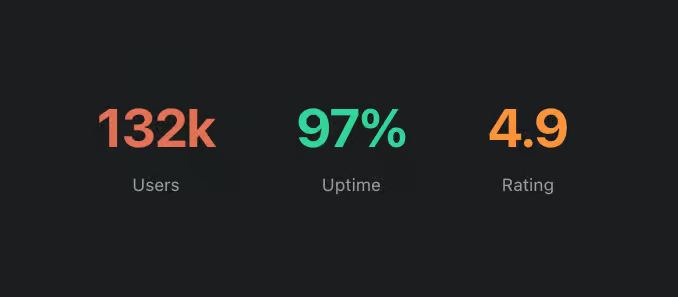
A count up animation makes a number run from zero to its final value when the visitor scrolls to it. You can build it with an IntersectionObserver and a short animation loop, or add it to any site with one HTML attribute. Here are both.
What is a count up animation?
A count up animation (also called an animated number counter) makes a number animate from a starting value to an end value. Typically it starts at zero, counts up to the target number, and uses easing so it starts fast and slows down toward the end. The animation triggers when the element scrolls into view, so visitors see it happen in real time.
You see count up animations on stats sections ("132k users"), pricing pages ("$25,000 revenue"), dashboards, and anywhere numbers tell a story. The movement draws attention and makes the data feel more impactful than static text.
How do you build a count up animation with HTML and JavaScript?
An IntersectionObserver starts each counter the first time it is half visible; requestAnimationFrame updates the number, and an ease-out curve makes it slow down at the end.
<span class="count" data-end="1500">0</span>
const reduce = matchMedia('(prefers-reduced-motion: reduce)').matches;
const io = new IntersectionObserver((entries, observer) => {
  entries.forEach(entry => {
    if (!entry.isIntersecting) return;
    observer.unobserve(entry.target);
    const el = entry.target, end = +el.dataset.end, start = performance.now(), duration = 2000;
    if (reduce) { el.textContent = end.toLocaleString('en-US'); return; }
    const tick = now => {
      const p = Math.min((now - start) / duration, 1);
      el.textContent = Math.round(end * (1 - Math.pow(1 - p, 3))).toLocaleString('en-US');
      if (p < 1) requestAnimationFrame(tick);
    };
    requestAnimationFrame(tick);
  });
}, { threshold: 0.5 });
document.querySelectorAll('.count').forEach(el => io.observe(el));
This covers whole numbers with a thousands separator. Prefixes, suffixes and decimals need a little more code, and that is where an attribute-based component saves time.
How do you add a count up animation with one HTML attribute?
Add the OneType Transforms script tag to your site. Count Up is a premium transform: you need a paid plan and your own token from transforms.onetype.ai/get-started.
<script src="https://cdn.transforms.onetype.ai/bundle/{YOUR-TOKEN}.js"></script>
Then add an element with the ot="count-up" attribute and the target number:
<div ot="count-up" ot-end="1500"></div>
When the element scrolls into view, it animates from 0 to 1500 with easing.
Can you customize the counter animation?
Yes. Everything is controlled through HTML attributes. Here are all the options:
Prefix and suffix - add text before or after the number. Dollar signs, percentage marks, "k" for thousands:
<div ot="count-up" ot-end="132" ot-suffix="k"></div>
<div ot="count-up" ot-end="25000" ot-prefix="$"></div>
Decimal places - show precision for ratings, percentages, or currency:
<div ot="count-up" ot-end="4.9" ot-decimals="1"></div>
<div ot="count-up" ot-end="25000" ot-prefix="$" ot-decimals="2"></div>
Duration - how long the animation takes in seconds. Default is 2:
<div ot="count-up" ot-end="1000" ot-duration="3"></div>
Starting value - count from a number other than zero:
<div ot="count-up" ot-start="500" ot-end="1500"></div>
Disable easing - use a constant linear speed instead of the default ease-out:
<div ot="count-up" ot-end="100" ot-easing="false"></div>
Replay on scroll - by default the counter plays once and stays at the final number. Set ot-once to false to replay every time the element scrolls back into view:
<div ot="count-up" ot-end="1500" ot-once="false"></div>
Custom separators - change the thousands separator or decimal character for different locales:
<div ot="count-up" ot-end="25000" ot-separator="." ot-decimal=","></div>
How to build a stats section with multiple counters
The most common pattern is a row of counters showing different metrics. Each counter is independent - it triggers when it scrolls into view. Here is a typical stats section:
<div style="display: flex; gap: 60px; justify-content: center;">
  <div>
    <div ot="count-up" ot-end="132" ot-suffix="k"></div>
    <p>Users</p>
  </div>
  <div>
    <div ot="count-up" ot-end="98" ot-suffix="%" ot-duration="3"></div>
    <p>Uptime</p>
  </div>
  <div>
    <div ot="count-up" ot-end="4.9" ot-decimals="1"></div>
    <p>Rating</p>
  </div>
</div>
Each counter animates independently when it enters the viewport. Mix different suffixes, decimals, and durations to make each number feel distinct.
Does it work on Webflow, WordPress, and Shopify?
Yes. The setup is the same on every platform - add the script tag once, then use the ot="count-up" attribute wherever you want a counter. Here is how to add it on each platform:
Webflow
Paste the script tag in Site Settings > Custom Code > Footer Code. For the counter, you have two options: add an Embed element with the HTML, or add ot|count-up and ot-end|1500 as custom attributes on any existing element. Requires a Basic plan or higher.
WordPress
Install the free WPCode plugin and paste the script tag in Header & Footer > Header. Then use a Custom HTML block in the Gutenberg editor for the counter markup. Works on any self-hosted WordPress site.
Squarespace
Add the script tag in Website > Website Tools > Code Injection > Header. Use a Code Block (set to HTML, Display Source off) for the counter. Requires a Core plan or higher.
Shopify
Add the script tag in theme.liquid before the closing head tag. Then use a Custom Liquid section in the theme editor. Works on Basic plan and up.
Elementor
Elementor Pro users can add custom attributes directly: go to Advanced > Attributes and add ot|count-up and ot-end|1500. Elementor Free users can use the HTML widget instead. Add the script tag via the free WPCode plugin.
Full configuration reference
Every option with its default value:
- ot-end - target number (required)
- ot-start - starting number (default: 0)
- ot-duration - animation duration in seconds (default: 2)
- ot-decimals - number of decimal places (default: 0)
- ot-prefix - text before the number, e.g. $ (default: empty)
- ot-suffix - text after the number, e.g. % or k (default: empty)
- ot-separator - thousands separator (default: ,)
- ot-decimal - decimal character (default: .)
- ot-easing - use ease-out animation (default: true)
- ot-once - play once or replay on every scroll (default: true)
Building the whole website, not one effect?
Describe your business in one sentence and Divhunt Studio builds the site for you. You can start from one of the website templates and change anything by chatting. Building is free; you pay when you publish.
FAQ
How do I make numbers count up when scrolling?
Observe the element with an IntersectionObserver and start the animation the first time it is visible, as in the code above.
How do I stop the counter from replaying?
With the attribute version it plays once by default; set ot-once="false" to replay. In the plain version, unobserve after the first run.
Is the count up animation accessible?
Show the final value to visitors who prefer reduced motion, and keep the final number in the page text so screen readers and search engines read it.